 |
| Chathuranga - Say What? |
| Hosted by eSnips |
Thursday, September 27, 2007


Wednesday, September 26, 2007


Monday, September 24, 2007
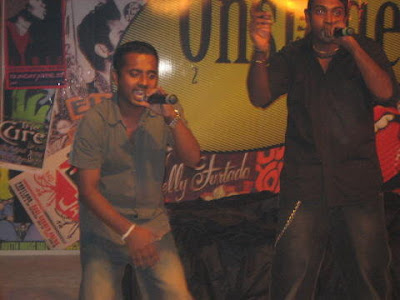
TNL Onstage 2007 Hip Hop / R&B Semi Final
Guest performance by Unsolved. I'm back baby!. Chek out the show next Thursday on ART TV at 10.00pm (not sure maybe 10.30).
More pics

More pics
Thursday, September 20, 2007

Sunday, September 09, 2007


Thursday, September 06, 2007
Your Guardian Angel
When I see your smile
Tears run down my face I can't replace
And now that I'm stronger I've figured out
How this world turns cold and breaks through my soul
And I know I'll find deep inside me I can be the one
I will never let you fall
I'll stand up with you forever
I'll be there for you through it all
Even if saving you sends me to heaven
It's ok.
Seasons are changing
And waves are crashing
And stars are falling all for us
Days grow longer and nights grow shorter
I can show you I'll be the one
I will never let you fall
I'll stand up with you forever
I'll be there for you through it all
Even if saving you sends me to heaven
Cuz you're my, true love, my whole heart
Please don't throw that away
Cuz I'm here for you
Please don't walk away,
Please tell me you'll stay, stay.
Use me as you will
Pull my strings just for a thrill
And I know I'll be ok
Though my skies are turning gray
I will never let you fall
I'll stand up with you forever
I'll be there for you through it all
Even if saving you sends me to heaven
Your Guardian Angel lyrics by The Red Jumpsuit Apparatus.
Tears run down my face I can't replace
And now that I'm stronger I've figured out
How this world turns cold and breaks through my soul
And I know I'll find deep inside me I can be the one
I will never let you fall
I'll stand up with you forever
I'll be there for you through it all
Even if saving you sends me to heaven
It's ok.
Seasons are changing
And waves are crashing
And stars are falling all for us
Days grow longer and nights grow shorter
I can show you I'll be the one
I will never let you fall
I'll stand up with you forever
I'll be there for you through it all
Even if saving you sends me to heaven
Cuz you're my, true love, my whole heart
Please don't throw that away
Cuz I'm here for you
Please don't walk away,
Please tell me you'll stay, stay.
Use me as you will
Pull my strings just for a thrill
And I know I'll be ok
Though my skies are turning gray
I will never let you fall
I'll stand up with you forever
I'll be there for you through it all
Even if saving you sends me to heaven
Your Guardian Angel lyrics by The Red Jumpsuit Apparatus.
Wednesday, September 05, 2007

Tuesday, September 04, 2007
Photoshop shortcuts
F1 - Toggles Adobe Online Help
F5 - Toggles Brush style palette
F6 - Toggles Colour, Swatches, Styles palette
F7 - Toggles Layers, Channels, Paths palette
F8 - Toggles Navigator, Info palette
F9 - Toggles Actions, History, Presets palette
Tab (Key) - Toggles all the palettes on screen
Shift + Tab (Key) - Toggles palettes on screen, excluding the Toolbar.
F5 - Toggles Brush style palette
F6 - Toggles Colour, Swatches, Styles palette
F7 - Toggles Layers, Channels, Paths palette
F8 - Toggles Navigator, Info palette
F9 - Toggles Actions, History, Presets palette
Tab (Key) - Toggles all the palettes on screen
Shift + Tab (Key) - Toggles palettes on screen, excluding the Toolbar.
| Main Toolbar | |||
| Key | Action | Action | Key |
| m | Marquee Tool  |  Move Tool Move Tool | v |
| l | Lasso Tool  |  Magic Wand Tool Magic Wand Tool | w |
| j | Airbrush Tool  |  Paintbrush Tool Paintbrush Tool | b |
| s | Rubber Stamp Tool  |  History Brush Tool History Brush Tool | y |
| e | Eraser Tool  |  Pencil Tool Pencil Tool | n |
| r | Blur Tool  |  Dodge Tool Dodge Tool | o |
| p | Pen Tool  |  Type Tool Type Tool | t |
| u | Measure Tool  |  Linear Gradient Tool Linear Gradient Tool | g |
| k | Paint Bucket Tool  |  Eyedropper Tool Eyedropper Tool | i |
| h | Hand Tool  |  Zoom Tool Zoom Tool | z |
| d | Default foreground and background colors. | ||
| x | Switches between foreground and background colors. | ||
| q | Switches between standard mode or quick mask mode. | ||
| f | Switches between screen modes. | ||
| TAB | Hides/Unhides open tools. | ||
| File Menu | |||
| Key | Action | ||
| CTRL + N | New | ||
| CTRL + O | Open | ||
| CTRL + ALT + O | Open As | ||
| CTRL + W | Close | ||
| CTRL + S | Save | ||
| CTRL + SHIFT + S | Save As | ||
| CTRL + ALT + S | Save a Copy | ||
| CTRL + SHIFT + P | Page Setup | ||
| CTRL + P | |||
| CTRL + K | Preferences > General | ||
| Edit Menu | |||
| Key | Action | ||
| CTRL + Z | Undo | ||
| CTRL + X | Cut | ||
| CTRL + C | Copy | ||
| CTRL + SHIFT + C | Copy Merged | ||
| CTRL + V | Paste | ||
| CTRL + SHIFT + V | Paste Into | ||
| CTRL + T | Free Transform | ||
| CTRL + SHIFT + T | Transform > Again | ||
| Image Menu | |||
| Key | Action | ||
| CTRL + L | Adjust > Levels | ||
| CTRL + SHIFT + L | Adjust > Auto Levels | ||
| CTRL + ALT + SHIFT + L | Adjust > Auto Contrast | ||
| CTRL + M | Adjust > Curves | ||
| CTRL + B | Adjust > Color Balance | ||
| CTRL + U | Adjust > Hue/Saturation | ||
| CTRL + SHIFT + U | Adjust > Desaturate | ||
| CTRL + I | Adjust > Invert | ||
| CTRL + ALT + X | Extract | ||
| Layer Menu | |||
| Key | Action | ||
| CTRL + SHIFT + N | New > Layer | ||
| CTRL + J | New > Layer Via Copy | ||
| CTRL + SHIFT + J | New > Layer Via Cut | ||
| CTRL + G | Group with Previous | ||
| CTRL + SHIFT + G | Ungroup | ||
| CTRL + SHIFT + ] | Arrange > Bring to Front | ||
| CTRL + ] | Arrange > Bring Forward | ||
| CTRL + [ | Arrange > Send Backward | ||
| CTRL + SHIFT + [ | Arrange > Send to Back | ||
| CTRL + E | Merge Down | ||
| CTRL + SHIFT + E | Merge Visible | ||
| Select Menu | |||
| Key | Action | ||
| CTRL + A | All | ||
| CTRL + D | Deselect | ||
| CTRL + SHIFT + D | Reselect | ||
| CTRL + SHIFT + I | Inverse | ||
| CTRL + ALT + D | Feather | ||
| Filter Menu | |||
| Key | Action | ||
| CTRL + F | Last Filter | ||
| CTRL + SHIFT + F | Fade | ||
| View Menu | |||
| Key | Action | ||
| CTRL + Y | Preview > CMYK | ||
| CTRL + SHIFT + Y | Gamut Warning | ||
| CTRL + + | Zoom In | ||
| CTRL + - | Zoom Out | ||
| CTRL + 0 | Fit on Screen | ||
| CTRL + SHIFT + 0 | Actual Pixels | ||
| CTRL + H | Hide Edges | ||
| CTRL + SHIFT + H | Hide Path | ||
| CTRL + R | Show Rulers | ||
| CTRL + ; | Hide Guides | ||
| CTRL + SHIFT + ; | Snap To Guides | ||
| CTRL + ALT + ; | Lock Guides | ||
| CTRL + " | Show Grid | ||
| CTRL + SHIFT + " | Snap To Grid | ||
| Help Menu | |||
| Key | Action | ||
| F1 | Contents | ||
| Other Shortcuts | |||
| Key | Action | ||
| Page Up/Down | Move view up/down 1 screen. | ||
| SHIFT + Page Up/Down | Nudge view up/down. | ||
| CTRL + Page Up/Down | Move view left/right 1 screen. | ||
| CTRL + SHIFT + Page Up/Down | Nudge screen left/right. | ||
| CTRL + SHIFT + Z | Previous History entry. | ||
| CTRL + ALT + Z | Next History entry. | ||
| SHIFT + - | Previous blending mode. | ||
| SHIFT + + | Next blending mode. | ||
Ctrl Short Cuts -
Ctrl + N - New Document Dialogue Box
Ctrl + M - Curves Dialogue Box
Ctrl + A - Selects all in the currently foreground document or currently selected layer
Ctrl + D - Deselects all in the currently foreground document or currently selected layer
Ctrl + J - Automatically creates a duplicate of the currently selected layer
Ctrl + K - Preferences Dialogue Box
Ctrl + L - Levels Dialogue Box
Ctrl + F4 - Closes current document
Ctrl + ' (Single Quote Key) - Toggles Grid Lines
Ctrl + Q - Quits Photoshop altogether
Ctrl + R - Toggles Rulers
Ctrl + U - Hue/Saturation Dialogue Box
Ctrl + O - Opens New File
Ctrl + P - Print Dialogue Box
Ctrl + Z - Undo last Action
Ctrl + Tab - Toggle between open documents
Ctrl + Shift + C - Copy Merged
Ctrl + C - Copy
Ctrl + H - Toggle Extras
Ctrl + ; - Toggle Guides
Ctrl + Shift + ; - Toggle Snap
Ctrl + X - Cut
Ctrl + Alt + Shift + X - Pattern Maker
Ctrl + V - Paste
Ctrl + Shift + V - Paste into selection
Ctrl + Alt + Shift + V - Paste Outside
Ctrl + T - Transform Tool
Ctrl + Shift + T - Repeats the last performed Transform
Shift + F5 / Shift + Backspace (Key) - Fill Layer Dialogue Box
Combination Number 9 Shortcuts - Ctrl + Shift / Alt -
Ctrl + M - Curves Dialogue Box
Ctrl + A - Selects all in the currently foreground document or currently selected layer
Ctrl + D - Deselects all in the currently foreground document or currently selected layer
Ctrl + J - Automatically creates a duplicate of the currently selected layer
Ctrl + K - Preferences Dialogue Box
Ctrl + L - Levels Dialogue Box
Ctrl + F4 - Closes current document
Ctrl + ' (Single Quote Key) - Toggles Grid Lines
Ctrl + Q - Quits Photoshop altogether
Ctrl + R - Toggles Rulers
Ctrl + U - Hue/Saturation Dialogue Box
Ctrl + O - Opens New File
Ctrl + P - Print Dialogue Box
Ctrl + Z - Undo last Action
Ctrl + Tab - Toggle between open documents
Ctrl + Shift + C - Copy Merged
Ctrl + C - Copy
Ctrl + H - Toggle Extras
Ctrl + ; - Toggle Guides
Ctrl + Shift + ; - Toggle Snap
Ctrl + X - Cut
Ctrl + Alt + Shift + X - Pattern Maker
Ctrl + V - Paste
Ctrl + Shift + V - Paste into selection
Ctrl + Alt + Shift + V - Paste Outside
Ctrl + T - Transform Tool
Ctrl + Shift + T - Repeats the last performed Transform
Shift + F5 / Shift + Backspace (Key) - Fill Layer Dialogue Box
Combination Number 9 Shortcuts - Ctrl + Shift / Alt -
Ctrl + Shift + O - Photoshop's File Browser
Ctrl + Shift + P - Page Setup Dialogue Box
Ctrl + Shift + S - Save As Dialogue Box
Ctrl + Shift + K - Color Setting Preferences Box
Ctrl + Shift + F - Fade Dialogue Box
Ctrl + Shift + X - Liquify Filter Tool
Ctrl + Shift + N - Create New Layer Preferences Box
Ctrl + Shift + M - Launches ImageReady
Ctrl + Shift + E - Merges all layers into a single layer
Ctrl + Alt + Z - Step Backward
Ctrl + Shift + - (Minus Sign Key) - Zoom Out
Ctrl + Shift + + (Plus Sign Key) - Zoom In
Ctrl + Shift + Alt + N - Creates a new empty layer
Ctrl + Shift + Alt + S - Save For The Web Dialogue
Ctrl + Alt (in most Dialogue Boxes) - Changes the 'Cancel' command to 'Reset'
Ctrl + Alt (in the 'Save For Web Dialogue') - Changes the 'Cancel' command to 'Reset' & the 'Done' command to 'Remember'
Ctrl + Alt + ~(Tild Symbol) - Selects the brightest area of the currently selected layer
Ctrl + Shift + I - Inverts a selection
Ctrl + Alt + X - Extract
Shift + -/+ signs(on a layer) - Toggles the different layer modes
Shift + Ctrl + Z - Step Forward
Ctrl + Shift + P - Page Setup Dialogue Box
Ctrl + Shift + S - Save As Dialogue Box
Ctrl + Shift + K - Color Setting Preferences Box
Ctrl + Shift + F - Fade Dialogue Box
Ctrl + Shift + X - Liquify Filter Tool
Ctrl + Shift + N - Create New Layer Preferences Box
Ctrl + Shift + M - Launches ImageReady
Ctrl + Shift + E - Merges all layers into a single layer
Ctrl + Alt + Z - Step Backward
Ctrl + Shift + - (Minus Sign Key) - Zoom Out
Ctrl + Shift + + (Plus Sign Key) - Zoom In
Ctrl + Shift + Alt + N - Creates a new empty layer
Ctrl + Shift + Alt + S - Save For The Web Dialogue
Ctrl + Alt (in most Dialogue Boxes) - Changes the 'Cancel' command to 'Reset'
Ctrl + Alt (in the 'Save For Web Dialogue') - Changes the 'Cancel' command to 'Reset' & the 'Done' command to 'Remember'
Ctrl + Alt + ~(Tild Symbol) - Selects the brightest area of the currently selected layer
Ctrl + Shift + I - Inverts a selection
Ctrl + Alt + X - Extract
Shift + -/+ signs(on a layer) - Toggles the different layer modes
Shift + Ctrl + Z - Step Forward
File Menu Shortcuts:
Ctrl+N: New Document
Ctrl+O: Open Document
Shift+Ctrl+O: Browse
Alt+Ctrl+O:Open As
Ctrl+W: Close
Ctrl+Shift+W: Close All
Ctrl+S: Save
Ctrl+Shift+S: Save As
Ctrl+Alt+S: Save a Copy
Ctrl+Alt+Shift+ S: Save for Web
Ctrl+Shift+P: Page Setup
Ctrl+Shift+M: Jump to Image Ready
Ctrl+Q: Exit
Viewing Shortcuts:
Ctrl+Y: Proof Colors
Ctrl++: Zoom In
Ctrl+-: Zoom Out
Ctrl+Alt++: Zoom In & Resize Window
Ctrl+Alt+-: Zoom Out & Resize Window
Ctrl+Alt+0: Actual Pixels
Ctrl+Shift+H: Show/Hide Target Path
Ctrl+R: Show/Hide Rulers
Ctrl+Shift+; : On/Off Snap
Ctrl+H: Show/Hide Extras
Ctrl+Alt+;: Lock Guides
Ctrl+;: Show Guides
Ctrl+': Show Grid
Tools Shortcuts:
A: Path Component Selection Tool
B: Paintbrush Tool
C: Crop Tool
D: Changes Default Colour Palettes To Black Foreground, White Background
E: Eraser Tool
F: Cycle Screen Modes
G: Gradient Tool
H: Hand Tool
I: Eyedropper Tool
J: Airbrush Tool
K: Slice Tool
L: Lasso Tool
M: Marquee Tool
N: Notes
O: Dodge/Burn/Sponge Tool
P: Pen Tool
Q: Quick Mask
R: Blur/Sharpen/ Smudge Tool
S: Clone Stamp
T: Type Tool
U: Shape Tool
V: Move Tool
W: Magic Wand
X: Swap Colours On Colour Pallete
Y: History Brush
Z: Zoom Tool
Layer Shortcuts:
Ctrl+Shift+N: New Layer
Ctrl+J: Layer via Copy
Ctrl+Shift+J: Layer via Cut
Ctrl+G: Group with Previous
Ctrl+Shift+] : Bring to Front
Ctrl+]: Bring Forward
Ctrl+[: Send Backward
Ctrl+Shift+[ : Send Back
Ctrl+E: Merge Layers
Ctrl+Shift+E: Merge Visible
Image Manipulation Shortcuts:
Ctrl+L: Adjust Levels
Ctrl+Shift+L: Adjust Auto Levels
Ctrl+Alt+Shift+ L: Adjust Auto Contrast
Ctrl+M: Adjust Curves
Ctrl+B: Adjust Color Balance
Ctrl+U: Adjust Hue/Saturation
Ctrl+Shift+U: Desaturate
Ctrl+I: Invert
Ctrl+Alt+X: Extract
Filters Shortcuts:
Ctrl+F: Last Filter
Ctrl+Shift+F: Fade
Ctrl+Alt+X: Extract
Ctrl+Shift+X: Liquify
Ctrl+Shift+Alt+ X: Pattern Make
Selection Shortcuts:
Ctrl+A: Select All
Ctrl+D: Deselect
Ctrl+Shift+D: Reselect
Ctrl+Shift+I: Inverse
Ctrl+Alt+D: Feather
Random Shortcuts:
Alt+Backspace: Fill with Forground Color
Shift+Backspace: Fill with Background Color
Alt+]: Ascend through Layers
Alt+[: Descend through Layers
Shift+Alt+]: Select Top Layer
Shift+Alt+[: Select Bottom Layer
Tab: Show/Hide All Palettes
Tuesday, August 14, 2007
Flow - Chathuranga
|
| Flow - Chathuranga... |
| Hosted by eSnips |
my comeback track (demo) after Unsolved... pls dont comment on the voice coz its not properly rehearsed and neither a studio cut... if u dont get wat da hell im sayin chek the lyrics
Flow - Chathuranga
why u got dat flow?
say what you mean there
how you got dat doah?
iv done that,and been there
why you tell me that you freestylin
when im jailin
now hear me
like this beat speaks for it self///
Im a fighta
i never failed any typa rymin lines
simple ,
ill take u through the whole thin 5 times,
later
check this beat and get it later,
buaai wat a come back
thought i missed da track right?
no!
im just tryin a make it clear
all u fake ass beat box its me will have to fear
why now ?
wanna make these luzsers understand,
by now,
you should really quit this luzser band man
say wat you got to say
i dont belive shit, homie
doin this for 10 years
made me do
this to me
but wait i got to say
somethin else b4
i think u need to knw
band was UNSOLVED
i guess the name kinda says it all
killer b and jonny g couldnt hang around to see it fall
let me get this through to u
with some rap street to u
next time rap im done feedin this, hip flex to u
why u got dat flow?
say what you mean there
how you got dat doah
iv done that,and been there
why you tell me that you freestyin
when im jailin
now hear me
like this beat speaks for it self
Friday, August 10, 2007
Saturday, August 04, 2007
Apologize
I'm holding on your rope,
Got me ten feet off the ground
I'm hearin what you say but I just can't make a sound
You tell me that you need me
Then you go and cut me down, but wait
You tell me that you're sorry
Didn't think I'd turn around, and say...
It's too late to apologize,
I'd take another chance, take a fall
Take a shot for you
And I need you like a heart needs a beat
But it's nothin new
I loved you with a fire red-
Now it's turning blue, and you say...
"Sorry" like the angel heaven let me think was you
But I'm afraid...
It's too late to apologize
I'm holdin on your rope, got me ten feet off the ground...
- "Apologize" by Timbaland Feat. One Republic.
Tuesday, July 31, 2007

Monday, July 30, 2007
Image Gallery
My first vectorizing .... I left the original art work (not done by me) without changing a thin... and ended up with this poster...
Image Gallery
Image Gallery
Sunday, July 29, 2007
Chamillionaire - Hip Hop Police (Official Video)
Great hiphop music...but i donno abt da video man... i was waitin for da longest time to see this video and it disappointed me.... its just talks abt da lyrics in da song... i expected a broader view....
Friday, July 27, 2007
Monday, July 23, 2007
Sunday, July 22, 2007
My new theme
I LOVE BLUE... its my fav color... iv gone through, black and white ...black.....earth colors.... but blue always stayed around....
Subscribe to:
Posts (Atom)